
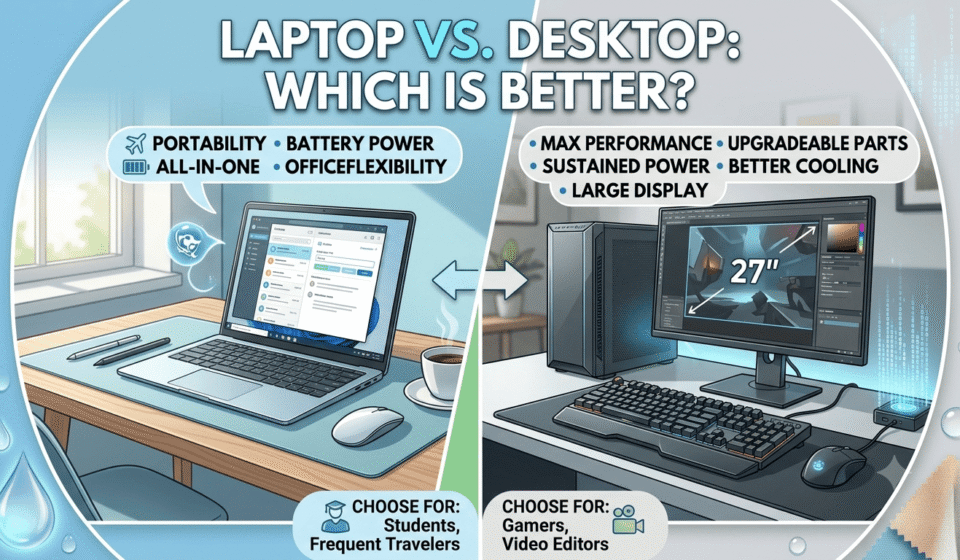

Buying a new computer always leads to the same question: laptop or desktop? Both do the same basic job, but they do it in very different ways, and the right choice depends much more on how someone actually works than on which machine sounds more impressive on paper.
This guide breaks the decision down by use case, budget, performance, and long-term value, so the choice becomes obvious rather than overwhelming.
Quick Answer
Neither a laptop nor a desktop is universally better. A laptop makes more sense when portability, battery life, and an all-in-one setup matter most. A desktop makes more sense when raw performance, easy upgrades, and better cooling matter most. The best choice depends on how the computer will be used in practice.
Laptop vs. Desktop: What’s the Difference?
Before comparing performance or price, it helps to understand what separates the two at a basic level.
A laptop is a portable all-in-one device. It is designed to be portable and comes with a display, keyboard, trackpad, and battery built in.
- Hand held
- Built-in display
- Built-in keyboard and trackpad
- Runs on battery power
- Compact, all-in-one design
A desktop, in contrast, remains stationary. It uses an extra monitor, keyboard and mouse and its larger case means larger, more powerful components.
- Designed to stay in one place
- Uses a separate monitor
- Uses a separate keyboard and mouse
- Houses larger, more powerful components
- Easier to open up and upgrade
That basic difference in design shapes almost everything else in this comparison.
Laptop vs. Desktop Comparison
Here’s a quick side-by-side look before getting into the details.
|
Factor |
Laptop |
Desktop |
|
Portability |
Excellent |
Poor |
|
Performance |
Very good |
Excellent |
|
Upgradability |
Limited |
Excellent |
|
Battery |
Yes |
No |
|
Space required |
Low |
Higher |
|
Cooling |
More limited |
Better |
|
Multi-monitor setup |
Possible |
Excellent |
|
Repairability |
Usually harder |
Usually easier |
|
Gaming |
Very good |
Excellent |
|
Travel |
Excellent |
Poor |
Keep in mind these are general trends, not hard rules. A high-end laptop can easily outperform a budget desktop, so the specific models you compare always matter more than the category itself.
Which Is Better for Performance: Laptop or Desktop?
For raw, sustained performance, desktops generally perform better, and the reason is space and cooling rather than anything else.
CPU Performance
Desktop processors can run in bigger cases with more room to dissipate heat, meaning they can maintain higher clock speeds for longer. Since laptop CPUs are designed to trade off power with heat and battery life, they commonly slow down during long, demanding workloads.
GPU Performance
Desktop graphics cards are bigger and consume more power, which directly translates to better gaming and rendering performance. Laptop GPUs are scaled-down versions, designed to fit within tight thermal budgets.
Cooling and Sustained Performance
A larger case for a desktop allows for larger fans, more airflow, and sometimes liquid cooling. Which means it can push components harder without overheating. Laptops, with their smaller frames, have less space to manage heat during long, demanding sessions.
Multitasking
Desktops are more likely to allow for more RAM and faster storage upgrades, which can really help when you’re running a few resource-hungry apps at once. They’re also good at multitasking, but they don’t last as long.
Desktops generally have more space for powerful components and better cooling, which means performance doesn’t degrade over time during sustained heavy workloads.
Which Is Better for Portability?
This one isn’t even close. Portability is a huge advantage of laptops and the No. 1 reason people prefer a laptop over a desktop.
Why laptops win
- Easy to carry between locations
- A built-in battery removes the need for a constant power source
- Built-in screen means no separate monitor to carry
- Works just as well at home, in a café, or on a flight
- A natural fit for students and mobile workers
Why desktops don’t compete here
A desktop needs a fixed setup with a monitor, keyboard, and mouse, and it depends on a constant power outlet. None of that travels well.
If someone regularly moves between home, office, college, or client locations, a laptop is almost always the better choice.
Laptop vs. Desktop PC: Which Is Better for Gaming?
Gaming is one of the biggest reasons people search for this comparison, and the answer depends heavily on how important portability is.
The comparison usually comes down to a few key factors:
- GPU performance
- Cooling efficiency
- Upgradeability over time
- Display options and refresh rates
- Price-to-performance ratio
- Portability
- Access to gaming peripherals
A desktop is the better choice for maximum gaming performance and long-term upgradeability. A gaming laptop makes more sense when someone wants to game on the move or doesn’t have space for a dedicated gaming setup.
That said, not every desktop beats every laptop. A high-end gaming laptop can outperform an entry-level desktop, so budget and specs matter just as much as the category.
Which Is Better for Work and Business?
Work needs vary so much that this question really depends on the type of work involved.
Office work: A desktop often makes sense for a fixed workstation, especially with multiple monitors already set up at a desk.
Remote work: A laptop offers more flexibility for switching between a home office, a coffee shop, or a co-working space.
Business travel: A laptop is the clear winner here, since it needs to move easily between meetings and locations.
Multiple monitors: Both can handle this task well, though desktops usually make multi-monitor setups simpler and more stable.
Video conferencing: Laptops usually have built-in webcams and microphones, while desktops often require separate accessories.
Long working sessions: Desktops offer more comfortable, ergonomic setups over extended hours, since the screen, keyboard, and mouse can all be positioned independently.
The right pick here depends on work style more than job title. Someone glued to one desk all day has different needs than someone who works from three different locations in a week.
Which Is Better for Students?
Students juggle classes, libraries, dorm rooms, and group study sessions, and that mobility usually settles the decision on its own.
Key factors to weigh:
- Portability between classes and study spots
- Battery life during long days on campus
- Available desk space in dorms or shared rooms
- Coursework requirements, like writing, research, or design
- Programming needs for computer science students
- Occasional gaming
- College or hostel living arrangements
- Overall budget
A laptop is usually more practical for students because it can be carried to classes, libraries, and study spaces without any extra setup.
A desktop can still make sense for students who mainly work from a dorm room or apartment and want stronger performance for gaming, editing, or heavier coursework.
Which Is Better for Video Editing and Creative Work?
Creative work relies on hardware specs, so this comparison depends on workload intensity.
Editors and designers should pay close attention to:
- CPU power for rendering and exporting
- GPU performance for effects and playback
- RAM for handling large project files
- SSD speed for fast file access
- Display quality and color accuracy
- Cooling during long render sessions
- Support for external monitors
Professionals working on heavy, stationary projects, like feature-length video edits or complex 3D renders, usually get more consistent performance from a desktop. Editors who need to work on location or travel frequently often lean toward a powerful laptop instead, accepting some performance trade-offs for flexibility.
Which Is Better for Programming and Software Development?
Developers have some of the most varied needs of any user group, making this one of the more balanced comparisons.
Things worth considering:
- Comfort with different IDEs and development tools
- Need for multiple monitors during coding sessions
- How often the work happens outside a fixed desk
- Battery life for coding on the go
- CPU and RAM requirements for compiling and testing
- Virtualization needs for running multiple environments
- The kind of development environment being used
There isn’t one universal winner here. A developer working from a single desk with heavy compiling or virtualization needs may prefer a desktop’s raw power. A developer who codes from different locations will likely value a solid laptop more.
Laptop vs. Desktop for AI Workloads in 2026
AI has become enough of a daily tool that it deserves its place in this comparison, and the distinction here matters more than people expect.
Relevant factors include:
- NPU (neural processing unit) capability
- GPU power for AI tasks
- VRAM capacity
- System RAM
- Whether AI models run locally or in the cloud
- Power consumption
- Cooling needs
- Long-term upgradeability
The most important distinction to understand: Using AI applications is not the same as running AI models locally.
Someone using ChatGPT, Gemini, or other cloud-based AI tools doesn’t need especially powerful hardware, since the heavy processing happens on remote servers.
Someone running larger AI models locally, or doing GPU-heavy AI development, needs far more VRAM, cooling, and raw power, which usually points toward a desktop.
Which Is More Affordable: Laptop or Desktop?
The sticker price alone doesn’t provide the complete picture. The real comparison has to account for what’s already included.
A laptop usually includes the following:
- Screen
- Keyboard
- Trackpad
- Battery
- Webcam
- Speakers
A desktop may require buying separately:
- Monitor
- Keyboard
- Mouse
- Speakers or headset
- Webcam
A desktop’s listed price often looks lower at first glance, but once these extras get added in, the total setup cost can end up close to, or even higher than, a comparable laptop.
Which Has Better Upgrade Options?
This is one area where desktops have a clear, consistent advantage.
Desktops make it far easier to upgrade individual parts over time:
- RAM
- Storage
- GPU
- CPU
- Motherboard
- Cooling system
- Power supply
Laptops can sometimes have RAM or storage upgraded, but the extent of these upgrades varies a lot by model, and many modern laptops solder these components in place, ruling out upgrades entirely.
Anyone who wants to keep upgrading a machine piece by piece over the years will get far more flexibility from a desktop.
Which Lasts Longer: Laptop or Desktop?
The honest answer isn’t a simple “desktop wins.” Longevity depends on several factors working together.
- Component quality
- Heat exposure over time
- Usage intensity
- Maintenance habits
- Repairability
- Upgrade options
- Battery degradation
- Availability of replacement parts
A desktop can often stay useful for longer because individual components can be swapped or upgraded instead of replacing the entire machine. A laptop’s battery, in particular, tends to degrade over a few years, and its sealed, compact design makes replacing internal parts harder and often more expensive.
Laptop vs. Desktop for Different Types of Users
|
If you are a… |
Better choice |
|
Student |
Laptop |
|
Frequent traveler |
Laptop |
|
Remote worker |
Laptop |
|
Office worker at one desk |
Either |
|
Gamer |
Desktop, if portability isn’t needed |
|
Video editor |
Desktop for heavy workloads |
|
Graphic designer |
Either |
|
Programmer |
Either |
|
Business traveler |
Laptop |
|
Local AI enthusiast |
Desktop for heavier workloads |
|
Casual home user |
Laptop or desktop |
These aren’t strict rules, just suggestions based on patterns that come up often. Depending on your needs, budget, and space, the right answer could go either way.
What Are the Disadvantages of Laptops?
Limited upgradeability
Most laptops limit how much RAM, storage, or graphics power you can add after purchase.
More difficult repairs
Compact, tightly packed designs make laptop repairs more time-consuming and often more expensive.
Thermal limitations
Smaller cases leave less room for cooling, which can lead to throttling during demanding tasks.
Battery degradation
Batteries naturally lose capacity over time, eventually needing replacement or shorter daily use.
Higher cost for some performance levels
Matching desktop-level performance in a laptop usually costs significantly more.
What Are the Disadvantages of Desktops?
No built-in battery
Desktops depend entirely on a constant power connection, with no backup during an outage unless a separate UPS is used.
Not portable
Moving a desktop setup means unplugging and repacking a monitor, keyboard, mouse, and tower.
Requires more desk space
A desktop setup takes up noticeably more room than a single laptop.
Additional peripherals may be needed
Monitors, keyboards, mice, and webcams often need to be purchased separately.
Higher power consumption in some configurations
High-performance desktop builds, especially gaming or workstation setups, tend to draw more power than a laptop doing similar work.
Laptop vs. Desktop: Which One Should You Buy?
Here’s a simple way to think through the decision.
Choose a laptop if:
- Travel is a regular part of life or work
- Studying happens across different locations
- Remote work means switching spaces often
- Battery power matters for the way the computer gets used
- Living or working space is limited
Choose a desktop if:
- Work happens primarily at one desk
- Maximum performance is the top priority
- Gaming involves demanding, graphics-heavy titles
- Video editing or 3D rendering is a regular task
- Easy upgrades matter for the long run
- Building or upgrading a system over time sounds appealing
Can You Use Both a Laptop and Desktop?
This option gets overlooked more often than it should, and it works well for a lot of people who don’t fit neatly into one category.
One popular setup pairs a laptop with a docking station and an external monitor, giving someone a full desktop-like experience at home while keeping the option to unplug and take the laptop anywhere.
Another way to do it is to use a powerful desktop computer for important work and a cheap, light laptop for running errands and traveling.
Either setup gives the flexibility of both worlds without forcing a single either-or decision.
Frequently Asked Questions
Is a laptop better than a desktop?
A laptop is better when you need portability. You can carry it to work, college, meetings, or while travelling. A desktop is better when you work from one place and want more performance or easier upgrades.
Is a desktop faster than a laptop?
A desktop is usually faster for demanding tasks. It can use larger cooling systems and more powerful hardware. This makes a desktop a strong choice for gaming, video editing, 3D work, and other heavy workloads.
Which is better for gaming, a laptop or desktop?
A desktop is usually better for gaming. It offers better cooling and more upgrade options. A gaming laptop is better if you want to play games in different locations.
Is a laptop or desktop better for students?
A laptop is usually better for students. It is easy to carry between classes, libraries, study rooms, and home. A desktop works well if the computer will stay in one place.
Which is better for office work?
A desktop is better for a fixed office setup. It works well with a large monitor and full-size keyboard. A laptop is better for people who work from different locations.
Which lasts longer, a laptop or desktop?
A desktop often lasts longer. You can replace or upgrade many desktop components. Laptop upgrades are more limited and depend on the model.
Is a desktop cheaper than a laptop?
A desktop can offer more performance for the same budget. However, you usually need to buy a monitor, keyboard, and mouse separately. A laptop already includes these essential parts.
Which is easier to upgrade?
A desktop is easier to upgrade. You can usually replace the RAM, storage, graphics card, power supply, and other components. Laptop upgrade options vary by model.
Is a laptop good enough for AI work in 2026?
A laptop is good enough for most cloud-based AI tools in 2026. You can use AI chatbots, writing tools, image generators, and other online services without a high-end computer. Running large AI models locally requires more powerful hardware.
Should I buy a laptop or desktop for working from home?
Buy a laptop if you need to work from different locations. Choose a desktop if you have a permanent home office. A desktop is also a better choice if you want more performance and easier upgrades.
Can a laptop replace a desktop computer?
Yes, a laptop can replace a desktop for most everyday tasks. It can handle office work, studying, browsing, streaming, and many programming tasks. A desktop is better for heavy gaming, video editing, 3D rendering, and other demanding workloads.
Is it better to have both a laptop and desktop?
Having both makes sense if you need portability and high performance. A desktop can handle demanding work at home. A laptop can be used for travel, meetings, classes, and work outside the home.