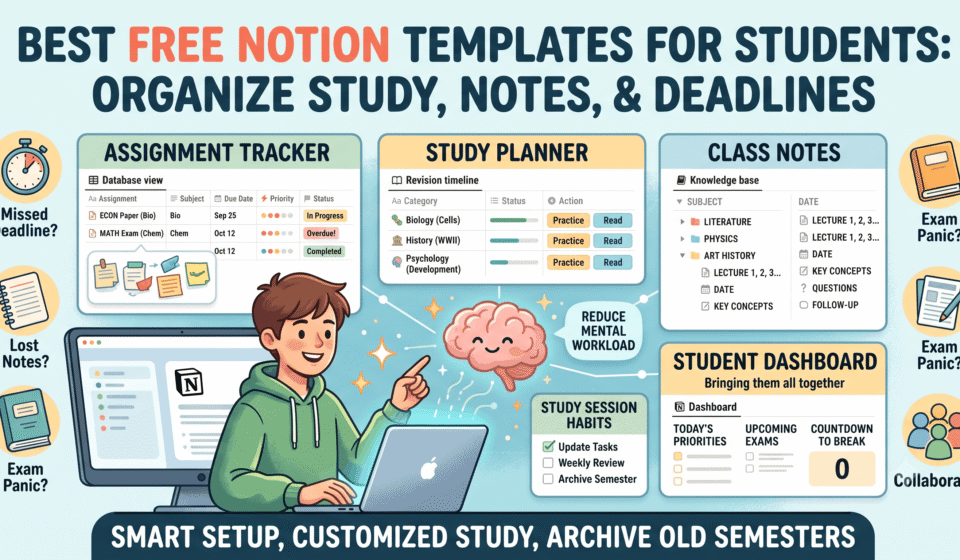

Being a student often means managing several things at once: lectures, assignments, exams, notes, group projects, personal goals, and sometimes a part-time job. The difficult part is not always the workload itself. It is remembering what needs to be done, when it is due, and where you saved the information.
That is where the best free Notion templates for students can make a practical difference.
Instead of building a productivity system from scratch, you can start with a ready-made template and customize it around your classes, study habits, and schedule. Notion currently has dedicated collections for student planners, study planners, class notes, assignment trackers, student dashboards, research, and other academic needs.
The important thing, however, is not choosing the template with the prettiest dashboard.
The right template is the one that reduces the amount of mental work required to stay organized.
What Are Notion Templates for Students?
Notion templates for students are pre-built pages or workspaces designed to organize academic information such as classes, assignments, deadlines, notes, exams, study sessions, goals, and resources.
Instead of creating databases and layouts manually, students can duplicate a template and adapt it to their needs.
A student planner might include a calendar and task database, while a study template could combine class notes, revision schedules, exam preparation, and reading lists.
The best templates are usually:
- Easy to navigate
- Customizable
- Focused on a specific academic need
- Simple enough to use consistently
- Structured around deadlines and priorities
- Flexible enough to work across different courses
Notion’s marketplace currently separates free templates into categories including student life, study planners, class notes, student dashboards, assignment trackers, test preparation, and academic research.
That variety is useful, but it can also create a new problem: template overload.
You do not need ten productivity systems to become organized. In many cases, one student dashboard combined with two or three focused databases is enough.
What Should the Best Free Notion Templates for Students Include?
Before choosing a template, look beyond its appearance.
A useful student template should solve a real organizational problem. For example, if you frequently forget assignment deadlines, an attractive notes template will not solve the issue. You need an assignment tracker or academic planner.
Here are the features worth looking for.
1. Task and Assignment Tracking
An assignment database should ideally let you record:
- Assignment name
- Course or subject
- Due date
- Priority
- Status
- Type of task
- Notes or instructions
A simple status system such as Not Started, In Progress, and Completed is often enough.
You can also create filtered views for assignments due this week, overdue work, or a particular subject.
2. Calendar or Schedule View
A calendar helps turn a long list of tasks into something you can understand at a glance.
For example, seeing three assignments and an exam scheduled within the same week immediately tells you that you need to start preparing earlier.
A student planner does not need an elaborate timetable. A basic calendar connected to your tasks can be more useful than a complicated schedule that takes several minutes to update every day.
3. Class Notes
A good Notion class-notes template should make it easy to organize information by:
- Subject
- Lecture
- Date
- Topic
- Reading
- Key concepts
- Questions
- Follow-up tasks
This becomes particularly useful when several subjects generate notes every week.
Instead of having dozens of disconnected pages, you can create a searchable academic knowledge base.
4. Exam and Test Preparation
Exam-focused templates can help students break a large syllabus into manageable sections.
Useful fields include:
- Exam date
- Subject
- Topics
- Revision status
- Practice questions
- Weak areas
- Study sessions
This changes exam preparation from “I need to study everything” into a series of smaller tasks.
5. Goals and Progress
Some students benefit from tracking semester goals, grades, projects, reading targets, or personal development.
However, goal tracking should remain practical.
A template with ten different goal categories may look impressive but become another thing you have to maintain. If you only need three goals for the semester, track three.
7 Types of Free Notion Templates Every Student Can Consider
There is no single best template for everyone. Your ideal setup depends on what is currently causing the most friction in your academic routine.
Here are seven useful categories to explore.
1. Free Notion Student Planner
A student planner is the broadest option.
It typically brings classes, assignments, deadlines, schedules, and personal tasks into one workspace.
This is a good starting point for students who currently use several disconnected tools for academic organization.
For example, imagine a college student taking five subjects. Instead of checking a messaging app for assignment instructions, a notebook for deadlines, a calendar for exams, and another document for notes, the student can create one central academic workspace.
The goal is not to put absolutely everything into Notion. The goal is to make important information easier to find.
Notion’s free student planner category includes a large collection of templates from Notion and independent creators.
Best for:
- College students
- University students
- Students managing multiple subjects
- Students who want one academic dashboard
2. Free Notion Study Planner
A study planner is more focused on the actual learning process.
It can help you decide what to study, when to study it, and what still needs attention.
A simple study planner might contain:
Subject → Topic → Study session → Revision → Practice
For example:
|
Subject |
Topic |
Status |
Next Action |
|
Biology |
Cell division |
In progress |
Review notes |
|
Economics |
Inflation |
Not started |
Read chapter |
|
History |
World War II |
Completed |
Practice questions |
Notion currently has a dedicated free study-planner category covering student planners, assignment trackers, test preparation, and academic research templates.
Best for:
- Exam preparation
- Students with large syllabi
- Revision planning
- Students who struggle to decide what to study next
3. Notion Assignment Tracker
If missed deadlines are your biggest problem, start here.
An assignment tracker is deliberately simple: it gives every task a place, deadline, and status.
You could create properties for:
- Assignment
- Subject
- Due date
- Priority
- Status
- Submission link
- Estimated time
Then create views such as:
Due This Week
Upcoming
Completed
By Subject
Notion has a dedicated free assignment-tracker collection with templates designed around deadlines, progress, and individual or collaborative assignments.
Best for:
- Students with frequent assignments
- Group projects
- Coursework-heavy programs
- Anyone who regularly forgets deadlines
4. Notion Class Notes Template
Taking notes is easy.
Finding the right note three weeks later is the real challenge.
A structured class-notes template can solve that problem by giving every lecture a consistent format.
For example:
Subject: Psychology
Lecture: Cognitive Development
Date: September 18
Key concepts:
Important examples:
Questions:
Further reading:
Revision required: Yes
You can then search or filter your notes when exams approach.
Notion’s marketplace has a dedicated free class-notes category, alongside other academic templates.
Best for:
- Lecture-heavy courses
- Research students
- Students who take digital notes
- Long-term academic reference
5. Notion Student Dashboard
A dashboard acts as your academic home page.
Instead of opening separate pages every time you want to check your schedule, assignments, or notes, the dashboard can display the information you need most often.
A useful student dashboard might show:
- Today’s tasks
- Upcoming deadlines
- Today’s classes
- Current subjects
- Exam countdown
- Quick links
- Weekly priorities
Notion has a dedicated free student-dashboard category intended for tracking assignments, exams, deadlines, courses, and extracurricular activities.
Best for:
- Students who want an all-in-one workspace
- Busy university schedules
- Students managing academics and extracurricular activities
6. Notion Exam Revision Template
Exam preparation deserves its own system when the syllabus is large.
Instead of writing “Study chemistry” in a task list, break the subject into specific topics.
For example:
Chemistry
- Atomic structure
- Chemical bonding
- Thermodynamics
- Organic reactions
- Electrochemistry
Then assign each topic a revision status.
You can add practice questions, difficult concepts, links to resources, and revision dates.
The advantage is visibility. You can quickly identify the topics that have not received enough attention.
Best for:
- University exams
- Competitive exam preparation
- Students studying several modules
- Revision-heavy courses
7. Notion Research and Thesis Template
Students working on dissertations, research papers, or major projects have different needs from students managing weekly homework.
A research-focused template can help organize:
- Research questions
- Sources
- Articles
- Authors
- Key findings
- Quotes
- Citations
- Draft sections
- Research notes
This is especially helpful when a project involves dozens of sources.
Notion’s study-planner marketplace includes a dedicated category for academic research templates, indicating that research organization is a distinct use case rather than simply another form of note-taking.
Best for:
- Dissertation students
- Master’s students
- Undergraduate research
- Long-form academic projects
How to Choose the Right Free Notion Template for Students
The best way to choose a template is to start with the problem rather than the template.
Ask yourself:
What keeps going wrong with my current system?
If the answer is missed deadlines, choose an assignment tracker.
If you cannot find your lecture notes, choose a class-notes system.
If exam preparation feels chaotic, choose a study or revision planner.
If everything is scattered across different pages, choose a student dashboard.
If you are writing a dissertation, look for a research-management template.
This approach is more useful than downloading a popular template simply because it has a visually impressive design.
Check the Template’s Complexity
A template should save time, not create administrative work.
Before committing to one, look at how many databases, properties, views, and linked pages it contains.
A beginner may be better served by a template with five useful sections than one containing twenty interconnected systems.
Check Whether You Can Customize It
Your academic schedule will change.
Subjects change. Semester dates change. Assignment types change.
A good template should let you add or remove properties and adapt views without rebuilding the entire workspace.
Check Whether It Is Actually Free
“Free template” can sometimes mean that the basic version is free while additional features are paid.
Before spending time customizing a template, check what is included.
Notion’s marketplace allows users to browse templates using free and paid categories, making it easier to identify templates available without purchase.
How to Build a Simple Student Workspace in Notion
You do not have to download a huge productivity system.
You can create a useful student workspace with four core pages:
Page 1: Dashboard
Use this as your home page.
Include:
- Today’s priorities
- Upcoming deadlines
- Quick links
- Current semester
Page 2: Courses
Create one entry for every subject.
Each course can contain:
- Course information
- Professor or instructor details
- Syllabus
- Class notes
- Reading
- Assignments
Page 3: Tasks
Track every academic task in one database.
Recommended properties:
Task | Course | Due Date | Status | Priority
Then create filtered views for the current week and upcoming deadlines.
Page 4: Notes
Create a consistent structure for lectures and readings.
This setup is intentionally basic.
You can add an exam tracker, habit tracker, grade calculator, research database, or reading list later if you actually need one.
Common Mistakes Students Make With Notion Templates
A productivity system can become counterproductive when it demands more attention than the work it is supposed to organize.
Downloading Too Many Templates
This is probably the easiest trap.
You find a beautiful student dashboard, then another study planner, then a separate habit tracker, then another notes system.
Suddenly, you spend more time organizing Notion than studying.
Choose one main system first.
Overdesigning the Dashboard
A dashboard does not need motivational quotes, decorative graphics, ten widgets, and multiple calendars.
The information you check every day should be the easiest information to access.
Tracking Everything
Not every part of student life needs a database.
If writing down your daily water intake does not help you reach an academic or personal goal, you probably do not need another tracker.
Ignoring Mobile Use
Students often move between classrooms, libraries, homes, and public transport.
Check whether your template remains practical on a phone. A system that works beautifully on a large monitor but takes twenty taps to update a task may become frustrating.
Are Free Notion Templates Better Than Building Your Own?
Not necessarily.
A template gives you a starting structure. Building your own workspace gives you complete control.
For beginners, a template can reduce the setup time and provide ideas for how databases and views can work together.
For experienced Notion users, creating a custom system may make more sense.
A useful middle ground is:
Start with a template → remove unnecessary sections → add what you actually need.
This gives you structure without forcing you to use somebody else’s entire productivity philosophy.
Free Notion Templates vs. Traditional Planners
Notion has some practical advantages over a traditional paper planner, particularly when academic information changes frequently.
A digital system can be searched, filtered, duplicated, linked, and reorganized.
For example, one assignment can be connected to a course, a deadline, and a project without having to rewrite the same information in multiple places.
However, paper planning still has advantages.
Some students remember information better when they physically write it down. Others find digital tools distracting.
The best system is therefore not automatically the most sophisticated one.
It is the one you will actually use.
How to Make a Notion Student Template Work Long-Term
The first week is easy.
The real test is whether you are still using the system six weeks later.
A few habits can make a significant difference.
Update Tasks Immediately
When a professor gives you a new assignment, add it immediately.
Do not rely on remembering it later.
Review Your Workspace Weekly
Spend five to ten minutes reviewing:
- Upcoming deadlines
- Overdue tasks
- Upcoming exams
- Unfinished notes
- Next week’s priorities
This small review can prevent your dashboard from becoming outdated.
Keep Statuses Simple
Three or four statuses are usually enough.
For example:
Not Started → In Progress → Submitted → Completed
You rarely need ten different stages for a university assignment.
Archive Old Semesters
At the end of a semester, move completed courses and old tasks into an archive.
Your active workspace should represent your current academic life, not every assignment you’ve completed since high school.
What Should You Put in a Notion Student Dashboard?
If you want a quick starting point, use this structure:
Today
- Priority task 1
- Priority task 2
- Class schedule
This Week
- Assignment deadlines
- Study sessions
- Exams
Courses
- Current subjects
- Course notes
- Resources
Progress
- Completed assignments
- Upcoming exams
- Semester goals
Quick Links
- Class notes
- Assignment tracker
- Reading list
- Research
This structure is enough for many students without becoming unnecessarily complicated.
Can Notion Templates Help With Exam Preparation?
Yes, but the template itself does not improve learning.
Its value comes from helping you organize the learning process.
For example, instead of keeping a vague task called “Prepare for final exam,” you can break preparation into specific actions:
- List all exam topics.
- Mark your confidence level for each topic.
- Schedule study sessions.
- Complete practice questions.
- Review weak areas.
- Revisit difficult topics before the exam.
This makes progress visible.
The same principle applies to assignments and research projects: turn vague academic goals into visible, actionable tasks.
Final Takeaway!
The best free Notion templates for students are not necessarily the most elaborate or visually impressive ones.
The right template should make everyday academic tasks easier: finding notes, remembering deadlines, planning study sessions, organizing courses, and understanding what needs attention next.
Start with your biggest problem.
Choose a free student planner if you need broader organization. Try an assignment tracker if deadlines are slipping through the cracks. Use a study planner for revision. Choose a class-notes template if information is difficult to find later. For dissertations and major projects, a research-focused workspace may be more appropriate.
Notion currently offers thousands of free templates across student planners, study planning, class notes, dashboards, assignments, research, and other academic categories, so there is no need to build everything from scratch.
The smartest approach is to start small, customize only what you need, and build your system around how you actually study.
A productivity template should disappear into your routine.
If you have to constantly manage the template itself, it has stopped being a productivity tool and become another assignment.
Frequently Asked Questions
What are the best free Notion templates for students?
The most useful free Notion templates depend on the student’s needs. Common options include student planners, study planners, assignment trackers, class-note templates, student dashboards, exam planners, and academic research templates. Notion provides free categories for each of these use cases.
Can college students use Notion templates for free?
Yes. Notion’s marketplace includes many templates marked as free, including student planners, study planners, assignment trackers, dashboards, and class-note systems. Students can choose a suitable template and customize its pages and databases around their courses and academic schedule.
Which Notion template is best for managing college assignments?
A Notion assignment tracker is useful when deadlines are the main challenge. Look for fields such as course, assignment, due date, status, and priority. A calendar or filtered “due this week” view can make upcoming coursework easier to see.
Are Notion student templates useful for university research?
Yes. Research-focused Notion templates can organize papers, sources, notes, research questions, citations, and project sections. They can be particularly useful for dissertations and long-term academic projects where information needs to remain searchable and connected.
How many Notion templates should a student use?
There is no fixed number, but starting with one central student workspace is usually simpler than managing several unrelated templates. Add an assignment tracker, notes database, exam planner, or research system only when it solves a specific problem in your academic workflow.